Dental revenue cycle management (RCM) is the full set of steps a practice uses to get paid for the care it delivers, from the moment a patient books an appointment to the moment the payment clears the bank. It runs through the front desk, the clinical chart, the billing team, and finance, and it covers eligibility, coding, claim submission, payment posting, denials, and patient collections. Billing is one stop on that route. RCM is the entire route, from booking to bank.
A full schedule does not guarantee a full bank account. Revenue rarely vanishes in one obvious event, instead it leaks in small, quiet ways: a claim nobody worked, an underpayment nobody flagged, a patient balance that aged into a write-off, an explanation of benefits (EOB) sitting in a portal that nobody opened. Each gap is easy to overlook on its own, which is why the total is so easy to underestimate, until the distance between what you produced and what you collected gets too wide to ignore.
Use the checklist below to pressure-test your own cycle and find those gaps before they cost you. The twelve steps are grouped into four phases and ordered the way money moves through a practice, from the front desk to the deposit.
Phase 1: Before the chair
1. Capture complete, accurate patient and subscriber details at booking. Most downstream denials trace back to a small slip at intake: a transposed member ID, an old address, the wrong subscriber on file. Get it right once and you save hours of rework everywhere after.
2. Verify eligibility and benefits before the appointment, not after. Confirm coverage is active and check frequency limitations, remaining maximums, and waiting periods before the patient is in the chair. Verifying after the visit is one of the most preventable reasons claims come back denied, and one of the most expensive to fix once treatment is already done.
3. Estimate patient responsibility up front. Patients who know their share before treatment pay faster and dispute less. An unexpected amount at checkout tends to become an aging balance three months later.
Phase 2: From treatment to submission
4. Document thoroughly and code accurately the same day. Clinical notes and CDT codes are what the payer reimburses against. Thin documentation or a single miscoded procedure invites downcoding, bundling, or a flat denial. Coding the same day keeps the detail fresh and the claim moving.
5. Scrub every claim before it leaves the building. Check attachments, narratives, X-rays, and tooth or surface detail against each payer’s requirements before you submit. A claim that goes out clean on the first pass is cheaper than one denied and returned again, necessitating more staff time than would have been necessary.
6. Submit, then track every claim through to an accepted status. Submission is not confirmation. Claims that sit in limbo without follow-up are the ones that age out. Give every claim an owner and a live status, and keep it there until the claim is resolved.
Phase 3: Getting paid
7. Post payments and remittances promptly, and reconcile to the penny. Posting EOBs and electronic remittance advice (ERA) by hand is slow and error-prone, and a single mismatched payment quietly distorts your whole accounts receivable (AR) picture. Fast, accurate posting is what keeps your numbers trustworthy enough to act on.
8. Work denials and underpayments while the window is still open. Payer appeal windows are short, often 30 to 90 days. A denial you work this week is recoverable revenue. The same denial at 120 days is usually a write-off. Underpayments deserve the same urgency, because payers do not send an alert when they have shorted you.
9. Bill patients clearly and make it effortless to pay. Once insurance settles, the remaining balance is yours to collect. Clean statements, plain language, and simple payment options turn patient AR from a collections chore into predictable cash.
Phase 4: Keeping the cycle healthy
10. Manage payer portal access and credentials securely. Logins on sticky notes and shared spreadsheets are both a security risk and a daily drain on time. When the right person cannot get into the right portal, follow-up stalls, and the money behind that follow-up stalls with it.
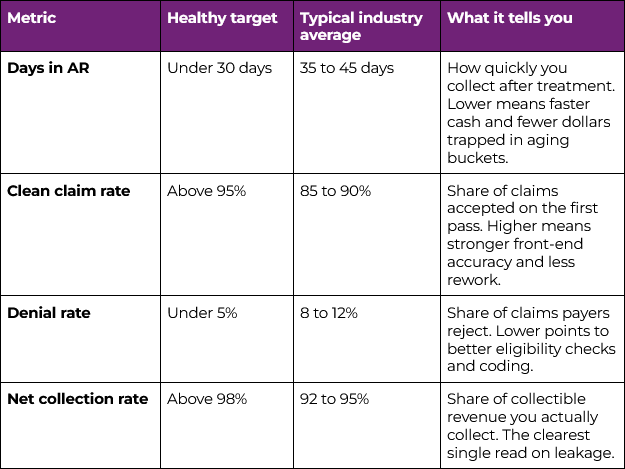
11. Track the metrics that reveal leakage. You do not need fifty reports, you only need a handful of numbers you can trust: days in AR, denial rate, clean claim rate, and how productive your team is on follow-up. Those few figures tell you where revenue is stuck while you can still do something about it (benchmarks for each are below).
12. Standardize the workflow across every location. One office can run on shared habit. Two, ten, or fifty cannot. As you add locations, “how we do it here” has to become “how we do it everywhere.” Consistent workflows are the difference between groups that scale cleanly and groups that scale their problems.
What good looks like: dental RCM benchmarks
Knowing the steps is one thing, and knowing whether your cycle is performing is another. The figures below are the ranges most commonly cited across dental practices and DSOs as healthy targets. Treat them as the approximate benchmarks for step 11 since the targets shift with your payer mix and specialty.
Where this gets difficult for DSOs
Executing all twelve steps, every day without anything slipping through can be difficult, and that difficulty compounds with every location you add. Teams drift into different habits, one office chases denials aggressively while another lets them lapse, visibility fragments across a dozen practice management systems and payer portals, and by the time a leak shows up in a report, the revenue is already gone. For multi-location groups and DSOs, RCM is no longer a checklist one person can run by hand, it becomes a system that has to run the same way across the whole organization.
How InsideDesk closes the gaps
This is the work InsideDesk was built to take off your team’s plate. Instead of bouncing between a dozen portals, spreadsheets, and phone queues, your team works the entire cycle from one place.
- InsideAssist automates the most time-consuming parts of insurance follow-up. It syncs daily with your PMS and payer portals, pulls open claims and live statuses, retrieves EOBs, and surfaces the next best action so your team always knows which claims to work first (steps 6 and 8).
- InsideRemit automates EOB collection and payment posting, using AI-driven electronic funds transfer (EFT) matching so remittances reconcile faster and far more accurately than manual entry allows (step 7).
- InsideDial uses AI to make payer phone calls for you, retrieving claim status, denial reasons, and payment details without your team waiting on hold, then updating the record automatically (steps 6 and 8).
- InsideIQ gives leaders real-time visibility into denial trends, AR aging, claim yield, and team productivity across every office, with benchmarking against 1,200+ supported DSOs (steps 11 and 12).
The results show up in the numbers a revenue cycle leader is focused on. On average, practices running on InsideDesk collect revenue about 34% faster. That speed comes straight from the checklist steps that usually drag: claims get worked the moment they are flagged instead of sitting untouched, payments post automatically instead of waiting on a person, and denials get attention while the appeal window is still open. Faster collection means fewer dollars stuck in aging buckets and a more predictable cash position month to month, which is what makes payroll, hiring, and expansion easier to plan around.
The same automation also recovers money that would otherwise leak out entirely. On average, offices collect roughly $65,000 more per location after adopting the platform. That figure is the underpayments that get caught, the denials reworked before they expire, and the EOBs pulled and posted instead of going missing in a portal. For a single practice, $65,000 is a considerable line on the P&L. For a group running twenty or fifty offices, that same per-location gain compounds into seven figures of recovered revenue that was already earned and simply was not being collected, none of it requiring a single additional patient.
Then there is the effect on your people. Billing teams using InsideDesk see about a 51% lift in productivity, because the platform removes the busywork that eats their day. The hours that used to disappear into hold music, portal logins, and manual data entry get redirected toward the small number of claims that need human judgment. The same headcount works more claims, resolves them faster, and burns out less. For DSOs trying to grow without adding billing staff at the same rate as new locations, that productivity gain is often the difference between scaling profitably and scaling overhead.
Each gain compounds:: faster collection, plus recovered leakage, plus higher throughput, applied the same way across every location on one platform powered by AI and robotic process automation (RPA). That consistency is what the twelve-step checklist implements, and what office-by-office manual processes struggle to deliver once a practice grows past a site or two.
Dental revenue cycle management FAQ
Is dental RCM the same as dental billing?
No, billing is one step inside revenue cycle management, the part where claims and statements go out. RCM is the entire process around it, from capturing patient details at booking through eligibility, coding, posting, denials, and final collections.
What are the stages of the dental revenue cycle?
In the order money moves: capture patient and insurance details, verify eligibility, estimate patient responsibility, document and code, scrub the claim, submit and track it, post payments, work denials and underpayments, bill the patient, and then keep the cycle healthy with secure portal access, the right metrics, and standardized workflows across locations.
What is a good days-in-AR benchmark for a dental practice?
High-performing practices keep days in AR under 30. The common industry range is closer to 35 to 45 days. Rising AR is usually an early sign that claims are aging before anyone works them.
What causes most dental claim denials?
The largest share trace back to the front end: eligibility not verified before the visit, incomplete documentation, and coding errors such as bundling or downcoding. Most are preventable with accurate intake and a claim scrub before submission.
How is RCM different for a DSO than for a single practice?
A single office can run RCM on shared habit. A DSO has to run it as a standardized system, because workflows, payer mixes, and practice management systems vary across locations. Success at scale depends on consistency, cross-office visibility, and automation rather than individual effort.
Where strong practices pull ahead
Dental revenue cycle management is not a single task, it is the connected path your revenue travels and it is only as strong as its leakiest step. The practices that consistently beat their peers are not producing more, they are losing less because their cycle is standardized, visible, and increasingly automated.
Want a version of this you can hand to your team? Download the free 12-Step Dental RCM Checklist and use it to audit your own cycle, office by office.
Ready to stop chasing claims, calling payers, and digging through spreadsheets? See InsideDesk in action.